


G3N - Go 3D Game Engine
**G3N** (pronounced "gen") is an OpenGL 3D Game Engine written in Go.
It can be used to write cross-platform Go applications that show rich and dynamic 3D representations - not just games. A basic integrated GUI framework is provided, and 3D spatial audio is supported through [OpenAL](https://www.openal.org/).
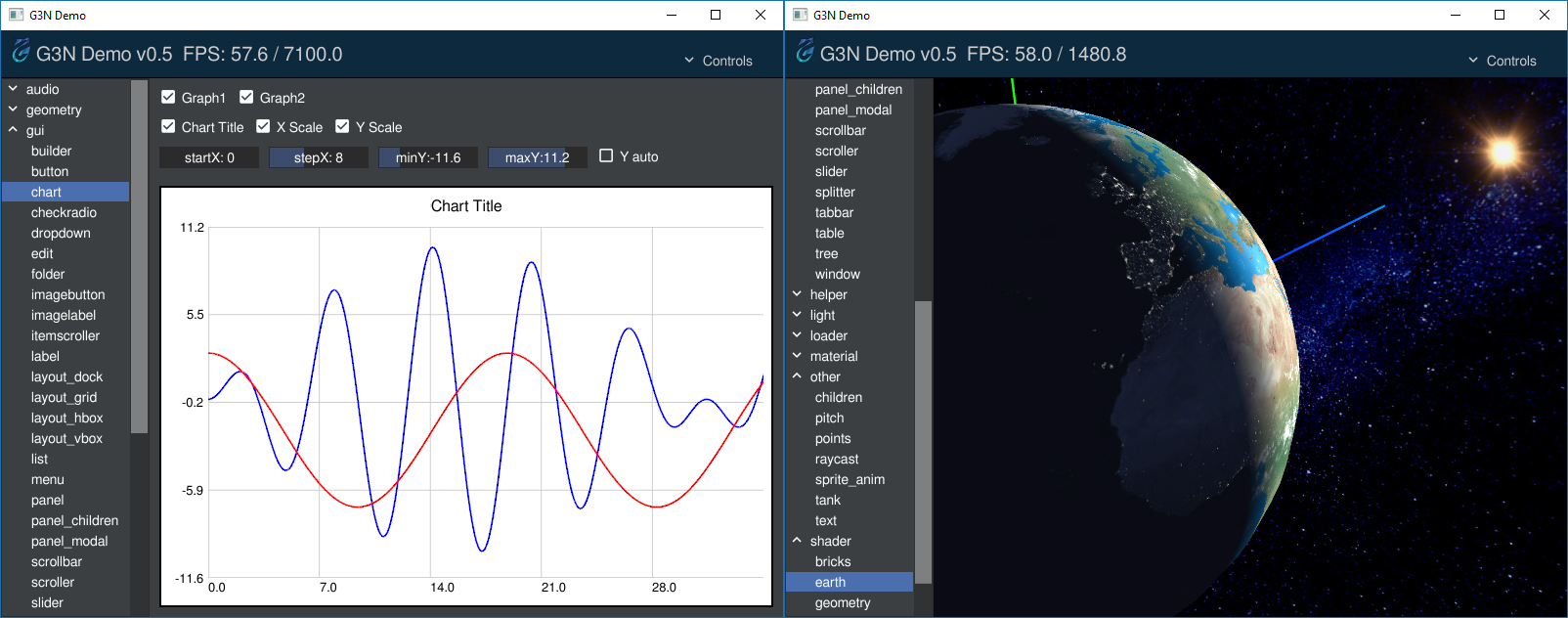
### **To see G3N in action try the [G3N demo](https://github.com/g3n/g3nd) or the [Gokoban](https://github.com/danaugrs/gokoban) award winning game.**
## Highlighted Projects Using G3N
* [Gokoban - 3D Puzzle Game (_1st place in the 2017 Gopher Game Jam_)](https://github.com/danaugrs/gokoban)
* [go-tsne (_dimensionality reduction particularly well suited for visualizing high-dimensional datasets_)](https://github.com/danaugrs/go-tsne)
* [G3N Server-Side Rendering](https://github.com/moethu/webg3n)
## Dependencies
**Go 1.8+** is required. The engine also requires the system to have an **OpenGL driver** and a **GCC-compatible C compiler**.
On Unix-based systems the engine depends on some C libraries that can be installed using the appropriate distribution package manager. See below for OS specific requirements.
### Ubuntu/Debian-like
$ sudo apt-get install xorg-dev libgl1-mesa-dev libopenal1 libopenal-dev libvorbis0a libvorbis-dev libvorbisfile3
### Fedora
$ sudo dnf -y install xorg-x11-proto-devel mesa-libGL mesa-libGL-devel openal-soft openal-soft-devel libvorbis libvorbis-devel glfw-devel libXi-devel
### CentOS 7
Enable the EPEL repository:
$ sudo yum -y install https://dl.fedoraproject.org/pub/epel/epel-release-latest-7.noarch.rpm
Then install the same packages as for Fedora - remember to use `yum` instead of `dnf` for the package installation command.
### Windows
We tested the Windows build using the [mingw-w64](https://mingw-w64.org) toolchain (you can download [this file](https://sourceforge.net/projects/mingw-w64/files/Toolchains%20targetting%20Win64/Personal%20Builds/mingw-builds/8.1.0/threads-posix/seh/x86_64-8.1.0-release-posix-seh-rt_v6-rev0.7z) in particular).
The necessary [audio DLLs](audio/windows/bin) are supplied and need to be added to your PATH.
If you would like to build the DLLs yourself you can find the libraries' source code and build instructions [here](audio/windows).
### macOS
Install the development files of OpenAL and Vorbis using [Homebrew](https://brew.sh/):
brew install libvorbis openal-soft
## Installation
The following set of commands will download and install the engine along with all its Go dependencies:
```
git clone https://github.com/g3n/engine g3n-engine
cd g3n-engine
go install ./...
```
## Features
* Cross-platform: Windows, Linux, and macOS. (WebAssembly is 90% complete!)
* Integrated GUI (graphical user interface) with many widgets
* Hierarchical scene graph - nodes can contain other nodes
* 3D spatial audio via OpenAL (.wav, .ogg)
* Real-time lighting: ambient, directional, point, and spot lights
* Physically-based rendering: fresnel reflectance, geometric occlusion, microfacet distribution
* Model loaders: glTF (.gltf, .glb), Wavefront OBJ (.obj), and COLLADA (.dae)
* Geometry generators: box, sphere, cylinder, torus, etc...
* Geometries support morph targets and multimaterials
* Support for animated sprites based on sprite sheets
* Perspective and orthographic cameras
* Text image generation and support for TrueType fonts
* Image textures can be loaded from GIF, PNG or JPEG files
* Animation framework for position, rotation, and scale of objects
* Support for user-created GLSL shaders: vertex, fragment, and geometry shaders
* Integrated basic physics engine (experimental/incomplete)
* Support for HiDPI displays

## Hello G3N
The code below is a basic "hello world" application ([hellog3n](https://github.com/g3n/demos/tree/master/hellog3n)) that shows a blue torus and a button that when clicked makes the torus red:
```Go
package main
import (
"github.com/g3n/engine/app"
"github.com/g3n/engine/camera"
"github.com/g3n/engine/core"
"github.com/g3n/engine/geometry"
"github.com/g3n/engine/gls"
"github.com/g3n/engine/graphic"
"github.com/g3n/engine/gui"
"github.com/g3n/engine/light"
"github.com/g3n/engine/material"
"github.com/g3n/engine/math32"
"github.com/g3n/engine/renderer"
"github.com/g3n/engine/util/helper"
"github.com/g3n/engine/window"
"time"
)
func main() {
// Create application and scene
a := app.App()
scene := core.NewNode()
// Set the scene to be managed by the gui manager
gui.Manager().Set(scene)
// Create perspective camera
cam := camera.New(1)
cam.SetPosition(0, 0, 3)
scene.Add(cam)
// Set up orbit control for the camera
camera.NewOrbitControl(cam)
// Set up callback to update viewport and camera aspect ratio when the window is resized
onResize := func(evname string, ev interface{}) {
// Get framebuffer size and update viewport accordingly
width, height := a.GetSize()
a.Gls().Viewport(0, 0, int32(width), int32(height))
// Update the camera's aspect ratio
cam.SetAspect(float32(width) / float32(height))
}
a.Subscribe(window.OnWindowSize, onResize)
onResize("", nil)
// Create a blue torus and add it to the scene
geom := geometry.NewTorus(1, .4, 12, 32, math32.Pi*2)
mat := material.NewStandard(math32.NewColor("DarkBlue"))
mesh := graphic.NewMesh(geom, mat)
scene.Add(mesh)
// Create and add a button to the scene
btn := gui.NewButton("Make Red")
btn.SetPosition(100, 40)
btn.SetSize(40, 40)
btn.Subscribe(gui.OnClick, func(name string, ev interface{}) {
mat.SetColor(math32.NewColor("DarkRed"))
})
scene.Add(btn)
// Create and add lights to the scene
scene.Add(light.NewAmbient(&math32.Color{1.0, 1.0, 1.0}, 0.8))
pointLight := light.NewPoint(&math32.Color{1, 1, 1}, 5.0)
pointLight.SetPosition(1, 0, 2)
scene.Add(pointLight)
// Create and add an axis helper to the scene
scene.Add(helper.NewAxes(0.5))
// Set background color to gray
a.Gls().ClearColor(0.5, 0.5, 0.5, 1.0)
// Run the application
a.Run(func(renderer *renderer.Renderer, deltaTime time.Duration) {
a.Gls().Clear(gls.DEPTH_BUFFER_BIT | gls.STENCIL_BUFFER_BIT | gls.COLOR_BUFFER_BIT)
renderer.Render(scene, cam)
})
}
```

You can download and install `hellog3n` via:
go get -u github.com/g3n/demos/hellog3n
For more complex demos please see the [G3N demo program](https://github.com/g3n/g3nd).
## Documentation
The complete engine API reference can be found here: [](https://godoc.org/github.com/g3n/engine).
There is also the beginning of a Getting Started Guide, and a newly created list of Guides and Tutorials:
* [Getting Started](https://github.com/g3n/engine/wiki/Getting-Started-(WIP))
* [Guides and Tutorials](https://github.com/g3n/engine/wiki/Guides-and-Tutorials)
Along with those, a good way to learn how to use the engine is to see the source code of [G3ND - the G3N demo](https://github.com/g3n/g3nd).
## Contributing
If you find a bug or create a new feature you are encouraged to send pull requests!
## Community
Join our [channel](https://gophers.slack.com/messages/g3n) on Gophers Slack ([Click here to register for Gophers Slack](https://invite.slack.golangbridge.org/)). It's a great way to have your questions answered quickly by the G3N community.